


Diamond Painting: Antistress
4.6125.00 Reviews
App Specs
- Version
- 1.53.0
- Updated On
- License
- Free
- Downloads
- 100,000+
- Developer
- Crimson Pine Games
- Categories
- Board
- Platform
- Android
Screenshots

 Analysis by AppCompare
I tend to judge a relaxing game by a practical question: does it feel calming after a few minutes, or does it become another task asking for my attention? Diamond Painting: Antistress leans toward the first. Its numbered designs give me a simple next step, while the gradual build-up of color makes each session feel like a small, visible accomplishment. That makes it easier to pick up when I want a quiet break without learning a complicated set of rules.
What to consider before you settle in
This is a board-style game from Crimson Pine Games, built around digital diamond painting rather than competition or strategic play. I’d choose it for a specific mood: I want something repetitive and creative, but I don’t want to arrange physical materials or commit to finishing a project in one sitting. The numbered cells keep the activity approachable, though the same structure may feel restrictive if I’m looking for freehand drawing or a puzzle that keeps changing its challenge.
The game is free to download and is rated for Everyone. Its average rating is 4.7 from around eight hundred ratings, and it has passed one hundred thousand installs. Those figures suggest that the calm, accessible format has found an audience, but they don’t tell me whether its pace will suit every player. The current version is 1.51.2, and in-app purchases range from $1.49 to $99.99 per item. I’d treat the free entry point as a chance to see whether I enjoy the core activity before spending anything.
A hands-on routine, not a race
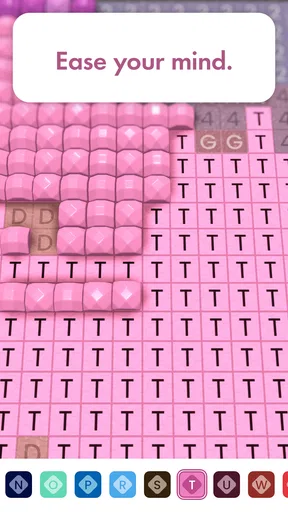
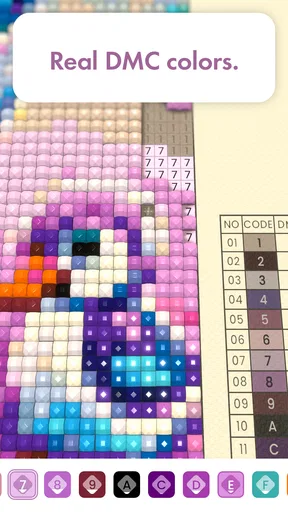
Once I choose a picture, the numbered areas give the session its rhythm: find the matching color, tap the cells, and watch the image fill in. The satisfaction comes less from making artistic decisions than from seeing a partly completed picture become recognizable. That distinction matters. If I want to express an idea from a blank canvas, a drawing app is a better fit; if I want a guided activity with a clear visual payoff, this format is easier to begin.
For a useful everyday test, I’d open it during a short pause after work and pick a design that looks manageable rather than treating a large picture as a project I must finish. A small section can make the break feel complete even when I have only a little time. On another day, I might return to the same picture and continue. The appeal is in being able to stop and restart at my own pace, not in chasing a score or beating a clock.
Where it fits among relaxing games
Compared with conventional jigsaw puzzles, this replaces moving pieces and testing their fit with repeated taps and color matching. Compared with paint-by-number apps, it gives the task a gem-by-gem feel, while still guiding me through marked areas. Those differences make it a good alternative when I want order and a sense of progress without a demanding brainteaser. They also explain why it may not hold my attention if I prefer varied mechanics, changing objectives, or a strong competitive element.
Physical diamond painting offers a more tactile, hands-on craft, but it needs supplies and a place to work. This phone-based version is easier to carry into a spare moment, although tapping a screen cannot reproduce the feel of handling actual gems. I see the two as different ways to enjoy a similar pattern-filling idea, rather than assuming the app replaces the craft for everyone. Someone who loves the physical materials may prefer a real kit; someone who wants a low-preparation digital pastime may prefer this.
Worth Reading Before You Choose

EA SPORTS FC Mobile 26 Is a Bigger Football Game, but It Takes Time

Flipboard Shows What News Apps Must Do Beyond the Feed

Switching to Android Auto Means Rethinking Your Driving Routine

Google Calendar Makes a Crowded Week Easier to Manage

Ludo King Makes the Most of the Minutes Between Plans

Baby Panda World Brings Quick Play to Modern Phones, but Its Game Library Feels Busy
Small choices that make sessions smoother
I get more out of this kind of activity when I decide what I want from a session before opening a design. If I need a quick reset, I choose something that looks simple and stop when the break is over. If I have a quiet evening, I can settle into a longer stretch without turning completion into a requirement. That small boundary helps keep a calming game from becoming one more item on a to-do list.
It is also worth thinking about the setting. The repeated tapping and visual focus suit a relaxed moment when I can give the screen some attention, but they are not ideal while walking, crossing a street, or doing anything that needs my eyes and hands elsewhere. For a commute, I’d use it only when I’m seated and can safely look down. For a waiting room or a quiet evening at home, it is easier to enjoy without rushing.
Discovering the Art of Diamond Painting
Alright, so you might be wondering, what exactly is diamond painting? Think of it as a mix between cross-stitch and paint-by-numbers, but with sparkly little gems. The app brings this unique art form to your fingertips, providing a satisfying way to unwind and unleash your creativity.
Getting Started with the App
Diving into the Diamond Painting: Antistress app is super easy. Once you download and install it, you’re greeted with a clean and intuitive interface. The app offers a variety of templates to choose from, ranging from simple designs to more intricate patterns. Trust me, there’s something here for everyone.
Each template is broken down into tiny squares, each marked with a number. These numbers correspond to specific colors of gems you’ll need to place on the template. It’s as simple as tapping and placing, but the satisfaction of seeing your masterpiece come to life is anything but ordinary.
The Zen of Diamond Painting
There’s something incredibly calming about the rhythmic tap-tap-tap as you place each gem. It’s almost meditative. I found myself losing track of time, completely absorbed in the process. It’s the perfect way to wind down after a long day.
The app also provides a soothing soundtrack, enhancing the relaxing experience. If you prefer your playlist, you can easily mute the app’s music and enjoy your own tunes in the background.
Features that Shine
One of the standout features of Diamond Painting: Antistress is its offline mode. You can work on your projects anywhere, anytime, without needing an internet connection. This makes it a great companion for commutes, flights, or just chilling at home.
Another cool feature is the ability to share your completed works directly from the app. You can show off your creations on social media or send them to friends and family. It’s a fun way to spread a little joy and maybe inspire someone else to try their hand at diamond painting.
Keeping It Fresh
The app regularly updates its library of designs, keeping things fresh and exciting. Whether you’re into landscapes, animals, or abstract art, there’s always something new to try. I love that there’s no pressure; you can work at your own pace, one gem at a time.
And if you’re feeling particularly creative, the app even allows you to create custom designs. Upload a photo, and the app will transform it into a diamond painting template. It’s a fantastic way to personalize your projects.
How to decide whether it suits you
The key question is whether following a color guide feels relaxing to you. Some people find repetition soothing; others quickly want more choice or a faster sense of change. I’d try a few sessions before deciding whether the routine clicks, and I wouldn’t judge it by how quickly I finish a picture. The game is at its best when I can enjoy the small steps without turning them into a target.
One useful way to approach a custom image is to choose a photo with a clear subject and strong separation between its main colors. That gives the finished pattern a better chance of reading clearly at a glance. A busy image with many similar tones may be less satisfying as a small, numbered design. I’d start with a picture I recognize easily, then see whether the conversion makes the process enjoyable before investing time in more personal choices.
Comfort, accessibility, and limits
The number-marked cells reduce the need to memorize colors, which helps make the activity approachable for newcomers. Still, the small areas call for steady visual attention and repeated taps. If close screen work is tiring, I’d keep sessions brief and adjust the device’s general display settings for comfort rather than pushing through discomfort. The Everyone age rating makes the game broadly suitable, but that does not mean every child will enjoy its patient pace; it is more about calm repetition than constant novelty.
Another trade-off is that a relaxing format can become monotonous. A soothing soundtrack and a clear image may help me settle in, but they cannot make every design equally engaging. If I notice that I’m tapping automatically and no longer enjoying the result, I’d switch activities instead of forcing myself to complete the picture. For a different kind of unwind, a word puzzle or a casual game with short changing rounds may be a better choice.
What to expect before spending
Because the game is free to start and offers optional purchases, I’d first explore the activity at no cost and pay only if I understand what an item would add to my own experience. The listed in-app purchase range is broad, so it is sensible to check the price shown for a specific item before confirming anything. I would not treat a purchase as necessary to decide whether the core tapping-and-coloring routine suits me, and I’d keep device purchase controls in mind if children use the phone.
For anyone wondering whether an internet connection is needed, the offline mode is a practical advantage for working on projects without a connection. I’d prepare by opening the app and choosing what I want to work on before a flight or a stretch with unreliable service, rather than assuming every online-related function will behave the same way offline. Sharing completed work is a separate use case: it is appealing when I want to show someone a finished picture, but it is not essential to the quiet, solo part of the game.
Who I’d recommend it to
I’d recommend it to someone who likes guided crafts, enjoys visible progress, and wants an easy activity to return to in short or longer sessions. It can also be a thoughtful option for a family member who prefers calm screen time to fast action, provided they are comfortable with small visual details. The game’s board-game classification may sound more strategic than the actual experience; I’d approach it as a gentle digital craft rather than expecting turns, opponents, or tactical decisions.
I’d skip it if I wanted a genuinely hands-on craft, freeform art tools, a social competition, or a game that constantly introduces new challenges. I’d also choose another activity when I need to keep my attention on the world around me. Those are not flaws so much as boundaries of this particular format. The main appeal is narrow by design: a guided picture, a color at a time, and the freedom to pause.
Keeping It Fresh
The app regularly updates its library of designs, keeping things fresh and exciting. Whether you’re into landscapes, animals, or abstract art, there’s always something new to try. I love that there’s no pressure; you can work at your own pace, one gem at a time.
And if you’re feeling particularly creative, the app even allows you to create custom designs. Upload a photo, and the app will transform it into a diamond painting template. It’s a fantastic way to personalize your projects.
Final Thoughts
In a world where we’re constantly on the go, Diamond Painting: Antistress offers a peaceful retreat. It’s perfect for those moments when you just need to unplug and unwind. Whether you’re a seasoned artist or just looking for a new hobby, this app is a gem (pun intended).
So, if you’re looking to add a little sparkle to your day, give this app a try. It’s the perfect blend of creativity and relaxation, and who knows—you might just find your new favorite pastime.
A sensible way to make the call
My recommendation is to try it when you have a genuinely quiet pocket of time, not while multitasking or expecting a burst of action. Give the numbered pattern a fair chance, use the option to silence the soundtrack if it does not suit your mood, and see whether watching the picture emerge feels rewarding. If it does, this is an easy low-preparation pastime to keep around; if it feels like repetitive screen work, there are plenty of other ways to unwind that offer more variety or a more tactile result.
Pros
- Relaxing and meditative gameplay experience.
- Easy-to-use interface for all ages.
- Wide variety of designs to choose from.
- Offline mode available for uninterrupted play.
- Regular updates with new patterns.
Cons
- Contains in-app purchases for premium designs.
- Ads can be intrusive during gameplay.
- Limited free patterns available.
- Performance issues on older devices.
- No option to customize own designs.
FAQs for Diamond Painting: Antistress
What is Diamond Painting: Antistress and how does it work?
Diamond Painting: Antistress is a relaxing mobile app that allows users to create beautiful art pieces by placing colorful diamonds on a canvas. The app provides a variety of templates and patterns to choose from. Users simply tap to place diamonds, following a color-coded guide to complete stunning artwork. It's a soothing activity that promotes mindfulness and creativity.
Is Diamond Painting: Antistress free to download and use?
The app is free to download on both Android and iOS platforms. It offers a range of free templates and features, but users can purchase premium content and additional tools through in-app purchases. These purchases might include exclusive patterns, diamonds, and an ad-free experience to enhance the overall enjoyment.
What are the benefits of using Diamond Painting: Antistress?
Diamond Painting: Antistress is designed to reduce stress and provide a calming experience. The process of placing diamonds can help users focus, offering a meditative effect. It's also a creative outlet, allowing users to express themselves artistically. The app can be a great way to unwind after a busy day or to take a break from daily routines.
Does the app require an internet connection to function?
Diamond Painting: Antistress can be used offline, allowing users to continue their projects without an internet connection. However, some features, such as downloading new templates or accessing premium content, will require an internet connection. It's ideal for users who want to enjoy the app during travel or in areas with limited connectivity.
Are there any age restrictions for using Diamond Painting: Antistress?
The app is suitable for users of all ages, offering a family-friendly experience. It can be particularly engaging for children, helping them develop fine motor skills and attention to detail. However, parents should be aware of in-app purchase options and may want to set restrictions to prevent unintended purchases.


